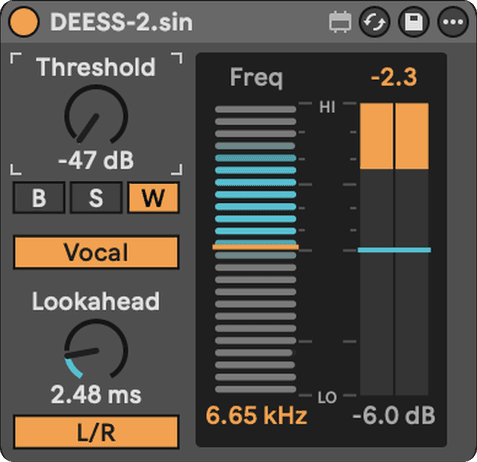
DEESS-2.sin
A de-esser that looks and feels like it came with Live.
Drop it on the vocal, set Threshold until the esses touch the edge of the column, done. The detector, the release and the bell all follow the performance.
CONTROLS
| Threshold | -48 to 0 dBlower it until the reduction column responds on sibilants, then stop before consonants lose definition | lower it until the reduction column responds on sibilants, then stop before consonants lose definition |
|---|---|---|
| Freq | 2–20 kHzthe band the detector follows | the band the detector follows |
| Range | -24 to 0 dBthe most reduction it's allowed to apply — not the sensitivity control | the most reduction it's allowed to apply — not the sensitivity control |
| Band | Bell / Split / Widea moving band, everything above Freq, or the full signal when the band fires | a moving band, everything above Freq, or the full signal when the band fires |
| Mode | Vocal / AllVocal keeps loud vowels out of the detector; All follows band level directly | Vocal keeps loud vowels out of the detector; All follows band level directly |
| Routing | L/R / MidMid de-esses the centre and leaves the sides untouched | Mid de-esses the centre and leaves the sides untouched |
| Lookahead | 0–15 msmore time to catch an onset; adds reported latency | more time to catch an onset; adds reported latency |
HOW IT WORKS
Vocal / All. Vocal mode raises the threshold as the spectral tilt falls — a loud vowel that leaks into the band does not trigger; an "s" does. All mode keys on band level and Threshold alone.
Bell / Split. Bell attacks only the selected frequency with a dynamic-Q bell that widens as the reduction deepens, so hard hits never ring. Split is a linear-phase crossover: everything above the frequency is reduced, everything below passes untouched.
Program-dependent release. A short "t" gets the base release; a held "sh" lengthens it, so the gain never chatters across a sibilant.
Mid routing. Decodes to Mid/Side, de-esses the Mid, passes the Side bit-clean and re-encodes — the width of a doubled or reverbed vocal bus is never touched.
2× oversampled gain stage. (a hidden Oversampling parameter turns it off from the automation lane if you need every cycle back).
FIRST MOVE
Close vocal: Vocal, Wide, Mid, Freq 7.5 kHz, Range -6 dB, Lookahead 5 ms — then lower Threshold until only the esses trigger.
TAME THE ESSES ON A LEAD VOCAL
- Drag DEESS-2 onto the lead vocal track. Mode Vocal, Band Wide, Routing Mid.
- Set Freq near 7.5 kHz and Range to -6 dB. Leave Lookahead at 5 ms.
- Play the loudest chorus. Lower Threshold until the reduction column moves on the esses and sits still on vowels.
- If the vocal turns dull, raise Threshold first — Range isn't the sensitivity control.
LATENCY — MEASURED
Every figure is host-measured on the production DSP by cross-correlating a probe against the rendered output (48 kHz). Latency is lookahead + 64 samples in every mode, and the device reports it to Live's delay compensation as you move the dial.
| Lookahead | Measured latency |
|---|---|
| 0 ms | 65 samples (1.4 ms) |
| 5 ms (default) | 304 samples (6.3 ms) |
| 10 ms | 544 samples (11.3 ms) |
INSTALL
Unzip, then move the whole DEESS-2.sin folder into your User Library under Max for Live Devices. Keep the folder together. Needs Ableton Live 12 with Max for Live. Install help →