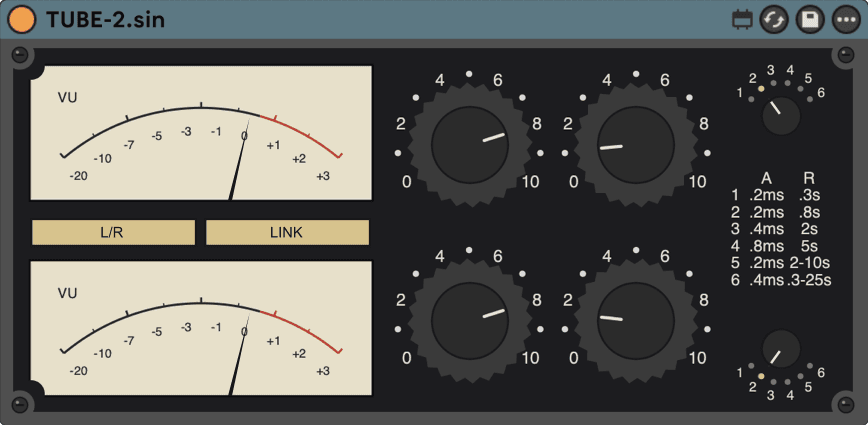
TUBE-2.sin
A variable-mu compressor with a feedback sidechain.
Two independent channels, each with its own gain, threshold and six-position time constant, linkable for stereo-bus duty.
CONTROLS
| In Gain L / R | 0–10per-channel drive | per-channel drive |
|---|---|---|
| Threshold L / R | 0–10per-channel threshold | per-channel threshold |
| Time Constant L / R | 1–6six release characters per side | six release characters per side |
| AGC | L/R · LAT/VERTwith Link: discrete L/R or mid/side-style sensing | with Link: discrete L/R or mid/side-style sensing |
| Link | OFF / LINKties both detectors for bus duty | ties both detectors for bus duty |
MEASURED · Measured effective ratio at default Threshold: 2.4:1 — a gentle, low-ratio glide. Reported latency at 48 kHz: 0 samples.
HOW IT WORKS
The panel prints no ratio numeral for TUBE-2 — the variable-mu topology has no single fixed ratio to label — so there's no printed-versus-measured comparison to make. At its default settings, the device's measured effective ratio is 2.4:1 at its default Threshold setting — a gentle, low-ratio glide into gain reduction rather than a hard knee. Because the sidechain reads gain reduction back from the output, the timing character each Time Constant position produces is a function of the whole loop, not a single fixed release stage — that's why six positions exist per channel instead of one release knob.
FIRST MOVE
On the mix bus, Link on, Time Constant 2 on both sides, and lower Threshold until the VU barely moves on the downbeats.
MIX-BUS GLUE THAT STAYS OUT OF THE WAY
- Put TUBE-2 on the Main track (or your mix bus group). Link on.
- Time Constant 2 on both sides; AGC L/R to start.
- Lower Threshold until the VU barely moves on the downbeats.
- Try AGC LAT/VERT and keep whichever leaves the center steadier.
LATENCY — MEASURED
At 48 kHz the device currently measures 0 samples of reported latency — it declares no lookahead control, so there is no additional plugin-delay compensation for Live to apply beyond the host's own block latency.
INSTALL
Unzip, then move the whole TUBE-2.sin folder into your User Library under Max for Live Devices. Keep the folder together. Needs Ableton Live 12 with Max for Live. Install help →