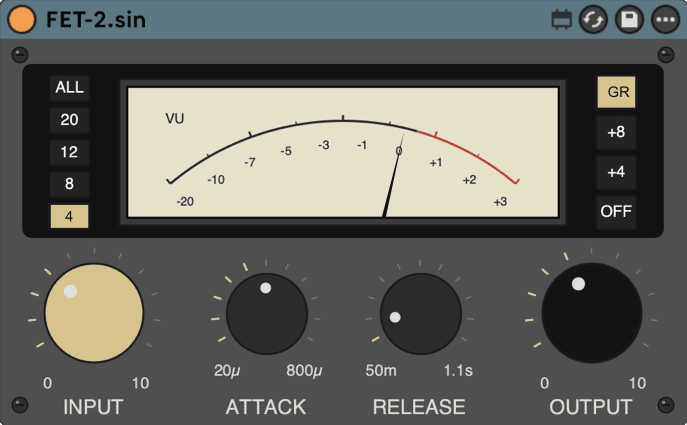
FET-2.sin
A FET-style limiter with a feedback sidechain.
Drive Input into a fixed internal threshold, pick a ratio position, and the feedback sidechain reads gain reduction back from the output. The peak catcher after your leveler.
CONTROLS
| Input | 0–10drives into a fixed internal threshold | drives into a fixed internal threshold |
|---|---|---|
| Attack | 20–800 µsin microseconds | in microseconds |
| Release | 50–1100 msenvelope release | envelope release |
| Ratio | 4 8 12 20 ALLfive fixed positions | five fixed positions |
| Out | 0–10makeup after limiting | makeup after limiting |
MEASURED · Position 4 measures 5.7:1; ALL measures 37.7:1. Reports 128 samples (2.67 ms at 48 kHz) of latency — Live's delay compensation lines it up automatically.
HOW IT WORKS
Each Ratio position's measured effective ratio, taken from the plugin's own compression curve rather than the printed numeral:
| Printed position | Measured effective ratio |
|---|---|
| 4 | 5.7:1 — measures steeper than its numeral |
| 8 | 10.6:1 — measures steeper than its numeral |
| 12 | 16.8:1 — measures steeper than its numeral |
| 20 | 32.3:1 — measures steeper than its numeral |
| ALL | 37.7:1 — steeper than any single button |
Every position measures steeper than its printed numeral, as the hardware it is modelled on does at the same button. This is a feedback sidechain: the detector reads gain reduction back from the output rather than the input, so the settled ratio is a property of the loop rather than a constant printed on the panel. Attack and Release behave across their full panel range; their exact settled millisecond value is program-dependent rather than a single fixed constant, so this listing prints no figure for either.
FIRST MOVE
After a leveler on a vocal, Ratio 4, fast Attack, and just enough Input to catch the consonants that jump out.
PEAK CATCHER AFTER THE LEVELER
- Place FET-2 after your leveler on the vocal.
- Ratio 4. Attack toward the fast end, Release around the middle.
- Raise Input until the VU flicks only on the peaks that poke out.
- Set Out so bypass compares at the same loudness.
LATENCY — MEASURED
At 48 kHz the device reports 128 samples (2.67 ms) of latency to Live: the FET character stage runs on a linear-phase transport whose delay is fixed and declared, so Live's plugin delay compensation lines the track up automatically. The figure is measured in the host by a null test against the dry signal, not taken from the declaration.
INSTALL
Unzip, then move the whole FET-2.sin folder into your User Library under Max for Live Devices. Keep the folder together. Needs Ableton Live 12 with Max for Live. Install help →