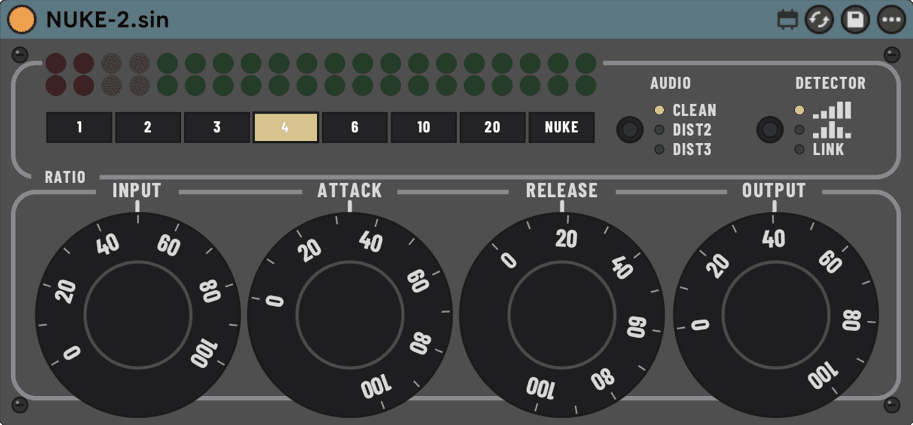
NUKE-2.sin
A fixed-ratio limiter with an all-buttons mode.
Eight fixed ratio positions from gentle glue to a destructive top setting. Drive Input, pick a position, done. Built for parallel drum smash.
CONTROLS
| Input | 0–10drives into a fixed internal threshold | drives into a fixed internal threshold |
|---|---|---|
| Attack / Release | 0.05–30 ms / 50–3000 msenvelope timing | envelope timing |
| Ratio | 1 2 3 4 6 10 20 NUKEeight fixed positions; NUKE is destructive by design | eight fixed positions; NUKE is destructive by design |
| Detector | HP / BAND / LINKfilters the sidechain before detection | filters the sidechain before detection |
| Audio | CLEAN / DIST2 / DIST3post-compression character | post-compression character |
| Output | 0–10makeup after compression | makeup after compression |
MEASURED · Printed positions measure steeper than their numerals — position 4 measures 6.2:1, NUKE measures 41.2:1. Reported latency at 44.1 kHz: 0 samples.
HOW IT WORKS
Every printed Ratio position's measured effective ratio, taken directly from the plugin's own compression curve:
| Printed position | Measured effective ratio |
|---|---|
| 1 | 1.0:1 |
| 2 | 3.9:1 — measures steeper than its numeral |
| 3 | 4.9:1 — measures steeper than its numeral |
| 4 | 6.2:1 — measures steeper than its numeral |
| 6 | 9.2:1 — measures steeper than its numeral |
| 10 | 21.1:1 — measures steeper than its numeral |
| 20 | 30.5:1 — measures steeper than its numeral |
| NUKE | 41.2:1 — measures steeper than its numeral |
Position 1 sits on its numeral; every other position measures steeper than the panel prints, so read the numeral as a position on the ladder, not a promise. Release is program-dependent rather than a single fixed time constant — the fitted release behaviour doesn't resolve cleanly to one exponential stage, so this listing prints no single millisecond figure for it; treat Release as a starting point and judge the result by ear. NUKE is a destructive setting by design — expect audible distortion, not transparent leveling.
FIRST MOVE
On a drum bus, start at Ratio 4 with Detector HP so the kick doesn't pump the whole kit, then raise Input until it grabs.
PARALLEL ROOM SMASH ON A RETURN
- Create a Return track and put NUKE-2 on it.
- Ratio NUKE, Audio DIST2, Detector HP.
- Send the drum group to the Return and pull the Return fader all the way down.
- Bring the Return up under the dry kit until the room breathes — stop before you notice it.
LATENCY — MEASURED
At 44.1 kHz the device currently measures 0 samples of reported latency — it declares no lookahead control, so there is no additional plugin-delay compensation for Live to apply beyond the host's own block latency.
INSTALL
Unzip, then move the whole NUKE-2.sin folder into your User Library under Max for Live Devices. Keep the folder together. Needs Ableton Live 12 with Max for Live. Install help →